
|


|
Viewer Toolbar
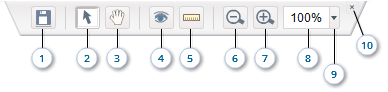
You will find the following buttons on the viewer toolbar:
|
|
| 1. File Menu |
Displays the File menu. See also File Management. |
| 2. Pointer | Allows you to exit the pan and ruler modes. |
| 3. Pan | Allows you to pan across the screen. |
| 4. Show/Hide |
Allows you to show or hide the grid, texts, dimension lines, ... |
| 5. Ruler |
Displays the ruler. |
| 6. Zoom Out | Decreases the zoom factor of the scene. |
| 7. Zoom In | Increases the zoom factor of the scene. |
| 8. Zoom Value | Displays the current zoom factor, also allows you to enter a new value. |
| 9. Zoom Menu | Opens the Zoom menu. |
| 10. Hide Toolbar | Hides the toolbar. |
Export Buttons
The following buttons appear when you choose Export Image... from the File menu:

|
|
| 1. Exit Export Mode | Allows you to exit the export mode. |
| 3. Save | Allows you to save the selected area into a file. |
See also Export Image.
Print Buttons
The following buttons appear when you choose Print... from the File menu:

|
|
| 1. Exit Print Mode | Allows you to exit the print mode. |
| 3. Print | Allows you to send the selected area to the printer. |
See also Print.
Note
When you hide the toolbar, the Show Toolbar button appears, which shows the toolbar if you click it.
When you hide the toolbar, the Show Toolbar button
appears, which shows the toolbar if you click it.